

Salesforce
integration
A two-way integration that automatically syncs contact and opportunity data from Goodworld to Salesforce.
How to connect Goodworld with Salesforce
- To begin the data integration, you simply connect Goodworld with your Salesforce account by clicking the 'Connect Salesforce’ button in the Goodworld Dashboard. Go to Settings > Integrations tab.
- This will prompt you to login to your Salesforce account. Please note that it is important that you login with a user that has sufficient access to your org. It is advisable to use an admin account.
- Salesforce will verify your account through a verification code, after successful verification, it will also ask you to allow access to Goodworld. Make sure you select the “Allow” button.
- After a successful connection, you will be redirected to the Goodworld Dashboard
- Note that duplicate data will not be created if there is an email match between users in Goodworld and Salesforce
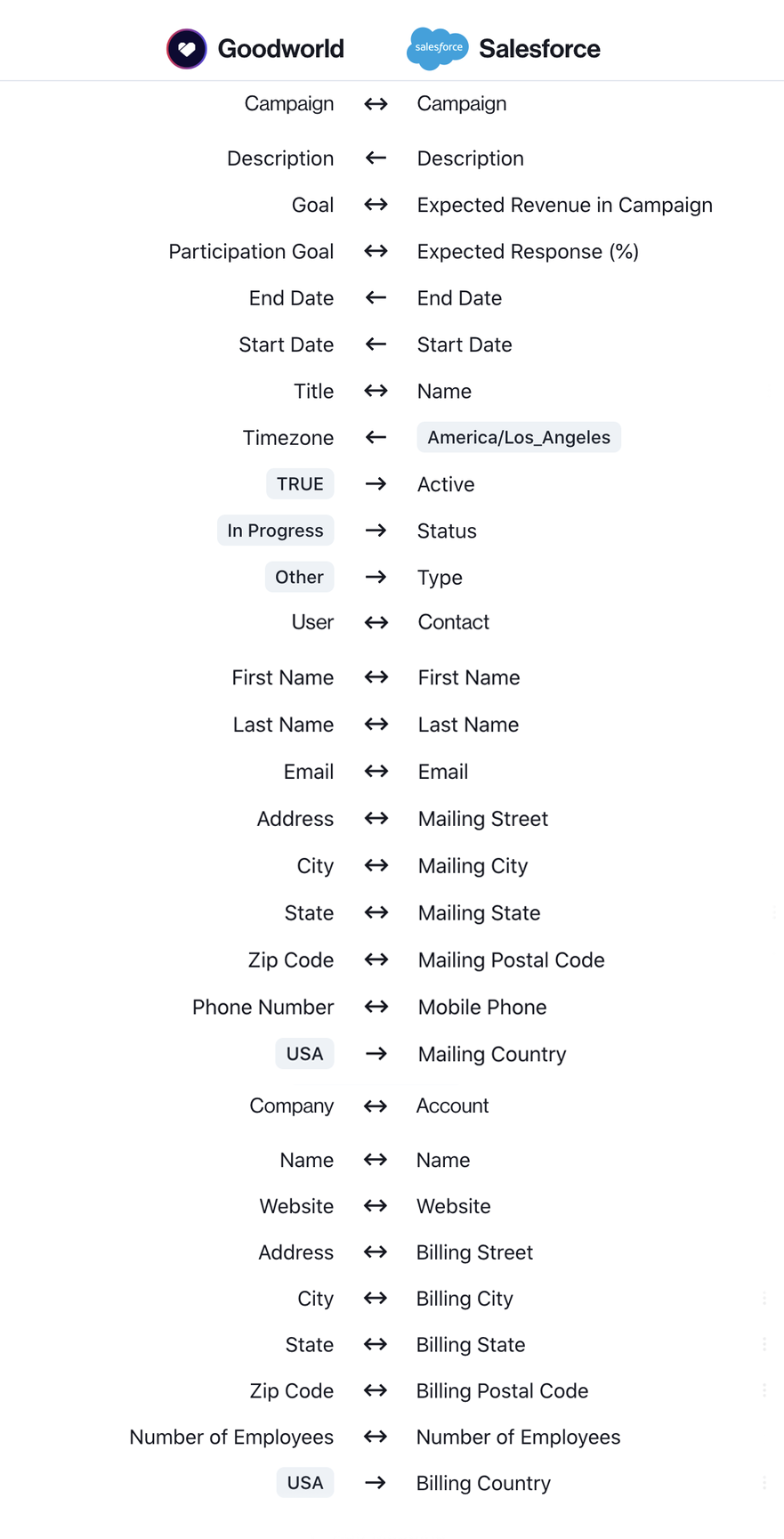
Goodworld to Salesforce field mapping
Primary Goodworld fields are sent to Salesforce as:
1. Contact ➔ Contact
2. Transaction ➔ Opportunity
3. Contact ➔ Account
4. Campaign ➔ Campaign
5. Amount ➔ Amount
6. Status ➔ Stage
7. Completed At ➔ Close Date
8. Honor ➔ Honor
Frequently asked questions
How does Goodworld manage existing Salesforce contacts and accounts?
Step 1: Goodworld checks if a contact with a matching email address exists; if this is the case, the Goodworld user is treated as an existing Contact in Salesforce. When no matching contact is found, step 2 is executed.
Step 2: Goodworld creates a new Contact in Salesforce with the First Name, Last Name, Email Address, and Address.
How does Goodworld handle recurring donations in Salesforce?
When a recurring donation is setup in Goodworld, we create a simple opportunity record in Salesforce just like we do for one-time donations. However whenever a new recurring donation invoice matures in Goodworld, we create a new opportunity in Salesforce.
How is Salesforce updated when a donation is updated on Goodworld?
When a donation is updated on Goodworld, the changes are replicated in your Salesforce Org too. The process is fairly straight forward unless the donor email is changed.